

Event run sheet templates in free formats for event planning
A free DOCX event run sheet template offers a practical starting point for planning an event in Sydney or Melbourne. Adapt it to your venue, schedule and team rather than relying on a generic layout.
The format is only the beginning. A useful event run sheet template also needs clear timings, task owners, key contacts, concise notes and contingency instructions. This guide shows how to organise those details into a working document for event day.
Learn how to tailor an event run sheet template to your event, prepare it for staff and suppliers, and make essential information easy to follow. A well-organised schedule gives the team a shared reference as activities move from setup to pack-down.
Table of Contents
What file formats can I download for a Run Sheet?
A free DOCX event run sheet template gives organisers in Sydney and Melbourne an editable starting point. DOCX works well when venue arrangements, suppliers or activity timings may change. Save a working copy, then tailor the fields to your team’s needs. Make the event name and document version easy to identify, so staff can distinguish the current schedule from earlier drafts.
Use the editable document to build a practical event-day rundown. A table can organise activities by time, location, task owner and notes. For a corporate event in Melbourne, add rows for speaker preparation, room transitions and technical cues. For a community event in Sydney, include site preparation, vendor movements and volunteer responsibilities. Keep each activity concise so readers can scan instructions quickly.
The template is a starting structure, not a complete event plan. Add the details that make each row actionable: what needs to happen, who is accountable and what the team needs to know. For example, note where a supplier should report or who can approve a schedule change. Keep emergency instructions and relevant venue details accessible in the working document.
To prepare the document for use:
Save a copy and label it with the event details and current version.
Adapt the columns to match the responsibilities and activities in your schedule.
Review the layout on screen, then print a copy if the team needs one onsite.
Use A4 paper for printed run sheets, one of the recommended paper sizes.
DOCX is useful when organisers need to revise text, add rows or adjust notes. A printed copy can help staff who need a quick reference while moving around a venue. Keep print and digital versions consistent: if a timing changes, update the working file and replace outdated copies in circulation.
Before sharing an event run sheet template, review it from each role’s perspective. A volunteer needs a clear arrival instruction, while a technical lead needs relevant cues and equipment notes. Check that activities follow a logical sequence and that everyone understands their responsibilities. This makes the document more useful for events in Sydney and Melbourne.
Choose a format that suits how your team will update and use the schedule. An editable DOCX event run sheet template can change as plans develop, while a clean print layout supports quick reference onsite. Both rely on accurate event details and clear instructions.
Keeping a printed version handy can give the team a quick reference. A run sheet is a document that outlines an event or production’s chronological schedule and tasks. Run sheet templates provide a structured format for organising timings, responsibilities, and activities. The example run sheet schedules the formal welcome for 12:00 and allocates 5 minutes to it.
An event run sheet should specify where each activity takes place. An event itinerary template can include fields for time, activity, location, speaker or lead, and notes. An event program can highlight the event’s purpose and theme, rather than simply list the day’s schedule.
Reducing event-day stress and planning for contingencies
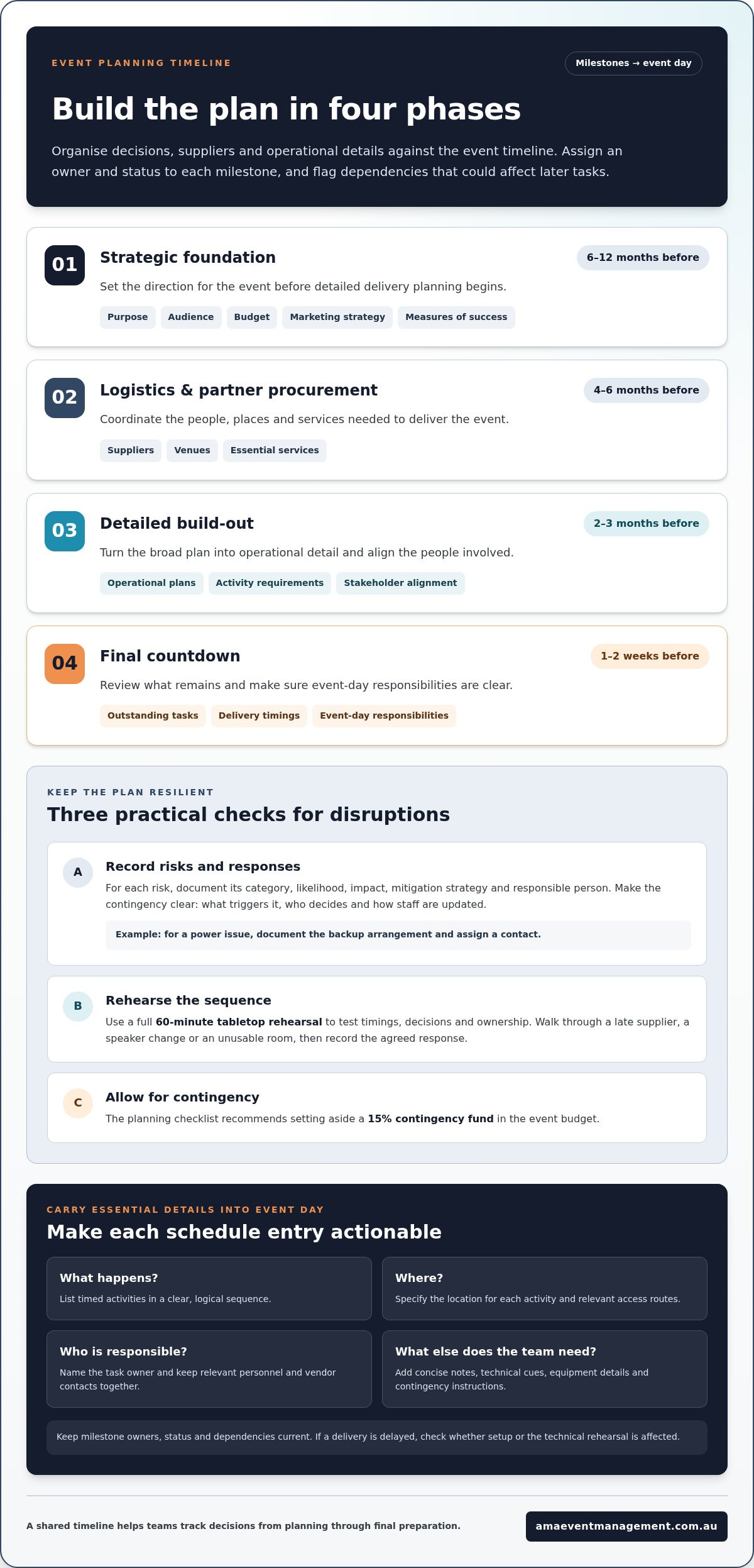
A planning timeline breaks a large event into milestones, owners and decisions. Use an editable event timeline template to record each task, its due date, its owner and its status. For example, mark supplier booking as “in progress” until the agreement and delivery timing are recorded. This gives stakeholders a shared view of dependencies, such as catering delivery, equipment access and venue setup.
Organise the plan around its recommended phases, then adjust the milestones to suit the event:
Strategic foundation, 6-12 months before: define the event purpose, audience, budget, marketing strategy and measures of success.
Logistics and partner procurement, 4-6 months before: coordinate suppliers, venues and essential services.
Detailed build-out, 2-3 months before: develop operational plans, confirm activity requirements and align stakeholders.
Final countdown, 1-2 weeks before: review outstanding tasks, delivery timings and event-day responsibilities.
These phases organise decisions; they do not replace the day’s operational schedule. Give each milestone an owner and status, then flag anything that could affect another task. A delayed equipment delivery, for example, may affect setup and the technical rehearsal. Recording dependencies helps the team identify a response before later activities are disrupted.
Plan for disruption in a separate risk management template. Record each risk category, its likelihood and impact, the mitigation strategy and the person responsible. A power issue might require a documented backup arrangement and an assigned contact. Keep the contingency action practical: state what triggers it, who makes the decision and how staff receive the update. A planning checklist also recommends setting aside a 15% contingency fund in the event budget.
Use a full 60-minute tabletop rehearsal to walk stakeholders through the event sequence. Test decisions as well as timings: what happens if a supplier arrives late, a speaker needs a change, or the planned room becomes unusable? Record the agreed response in the relevant document, then carry essential instructions into the event-day plan. This rehearsal helps reveal unclear ownership and gaps between teams.
Site planning can prevent avoidable access and movement problems. An event venue checklist can cover capacity, parking, signage, accessibility and emergency plans. Map guest, staff and supplier routes, then consider where catering deliveries or equipment movement may intersect with attendee access. Make instructions location-specific, such as identifying the vendor loading entry or the accessible route to the main room.
Keep editable documents aligned as planning progresses. When a milestone changes, update its owner, status and related contingency notes together. This review keeps the timeline, supplier arrangements and site plan consistent as the event approaches.
Including key contacts and notes
Australian event safety requirements depend on the event, site, activities and jurisdiction. Include relevant emergency procedures, responsible personnel and emergency contacts in the event plan so the team can find essential details quickly.
Use a contact register as the central reference for people who need to act on event day. Record each person’s name, role, organisation and contact details, alongside their responsibilities. Include relevant venue personnel, suppliers, staff, speakers and the event lead. For a conference, note who manages speaker access and who can address a room or equipment issue.
Venue: record the site contact and the location of the event’s agreed meeting point.
Suppliers: list the vendor contact, service provided and arrival or delivery notes.
Event team: identify the person responsible for schedule changes and staff updates.
Speakers: note arrival arrangements, presentation needs and the person coordinating them.
Make emergency information practical and venue-specific. Record the relevant procedures, who coordinates a response and how the team will communicate instructions. A venue checklist can track emergency plans alongside capacity, parking, signage and accessibility. Add location details, such as the room or site area where staff should direct attendees.
Notes should explain what a task requires, not repeat its title. “Speaker ready” offers little direction; “collect slides from the speaker and alert the stage lead” gives a clear action. In an event communication plan, record the audience, message purpose, delivery method, responsible person, send date and status. This helps coordinate updates with stakeholders and suppliers.
Keep current contact details with the event documents used by the team. When a supplier or speaker changes, update the register and related task notes together. Before sharing, check that each contact has a defined role and that instructions identify the relevant location. A concise checklist can catch missing details before the team relies on them.
After the event, use an evaluation template to capture feedback and follow-up actions. The event evaluation template includes ratings on a scale from one to five. Pair a rating with a brief note, such as a delayed speaker handover or a clear supplier update. This makes the debrief useful for future conferences, rather than just a general impression of success.
Close the debrief by assigning an owner to each follow-up task. For example, the event lead can record a revised speaker handover process, while the supplier coordinator updates delivery notes. Keeping contacts, operational notes and evaluation actions together gives the next planning cycle a clear starting point.
The event run sheet can bring critical information together, including vendor contact numbers and speaker requirements. Keep it aligned with the contact register so the team can find essential details in one place. Include key contacts and notes that clarify each person’s event responsibilities. When a contact or requirement changes, update the run sheet and related records, then ensure the team can access the current information during event preparation and delivery.
Detailed event run sheets
A detailed run sheet turns the event programme into a working document for delivery. It may also be called a run of show, production schedule, event schedule, show flow, show schedule or event-day timeline. Event planners, production managers and project coordinators use these documents to track activities, cues and responsibilities. Include enough detail for each person to act without searching through separate planning notes.
An event run sheet should include event details, time slots, task descriptions, assigned personnel and special notes. Give every activity a start and end time, identify its location and name the accountable person. A schedule can also use columns for time, activity, location, assigned lead and notes.
Make timings specific enough to coordinate handovers and dependencies. A speaker’s arrival, microphone check and stage entry, for example, are distinct actions, even when they relate to one presentation. Record each action’s start and end time, then state the cue for moving to the next task. Build the schedule around actual activity durations and supplier requirements.
Write task descriptions that explain the action, not just the department involved. “Audio team” does not say what needs to happen; “test handheld microphone before speaker enters” gives the crew a clear instruction. Assign one accountable lead to each task, even when several people contribute. This reduces uncertainty if the schedule changes or a cue is missed.
Time: show the activity’s start and end.
Activity: state the task or programme segment.
Location: identify the room, stage or site area.
Assigned lead: name the person accountable for execution.
Notes: record cues, requirements or contingency actions.
For technical production, connect each cue to the action that follows. A keynote entry might specify the stage entrance, presentation file and lighting cue. Put instructions beside the relevant activity, rather than in a separate document the crew must locate. Clear headers, consistent time intervals and readable fonts make the schedule easier to scan.
Before sharing, check task timings and contact details, confirm supplier timings and bookings, and make sure activities flow logically. Compare the schedule with the venue plan and production requirements. If an activity moves, update dependent cues and notify the people responsible. Keep the document a usable guide, not an archive of every planning discussion.
Add a contingency to the relevant row, with its trigger, response and decision-maker. For instance, if a speaker’s presentation file will not open, the note can direct the lead to use the approved backup copy. Linking the response to the exact cue and location helps coordinators, technical crews, caterers and volunteers understand what happens next.
Clearly label the final version and remove superseded drafts from circulation. This simple document-control step helps staff follow the same schedule and avoid acting on outdated timings.
Downloading a free event run sheet template
A free DOCX run sheet is an editable starting point for an event in Sydney or Melbourne. Save a working copy before making changes, then label it with the event name and version. This preserves the source file and helps your team recognise the current schedule. DOCX is useful when planning details change and activities or notes need revising.
Tailor the event run sheet template to the event format and the people using it. For a conference in Melbourne, add fields for speaker sessions, presentation cues, room transitions and technical support. For a wedding in Sydney, organise the day around the ceremony, speeches, photography and guest movements. In either case, make responsibilities clear to staff, suppliers and volunteers.
Before editing, decide what the team needs to find quickly. Keep useful schedule fields, remove irrelevant ones and add event-specific instructions. For example, include a supplier arrival point or a volunteer’s assigned task. Put emergency procedures where relevant staff can find them, and tie directions to the venue layout.
Prepare the downloaded document in a few deliberate steps:
Save a separate working copy and give it a recognisable event name.
Adapt the fields to match the schedule, roles and locations.
Review the layout on screen and make sure notes remain readable.
Print on A4 paper if team members need a hard copy onsite.
An editable document supports planning revisions, while a printed version can help staff who need to refer to the schedule away from a screen. Keep both versions aligned. If a session, supplier arrival or location changes, update the working file and replace outdated copies in circulation.
Before sharing the event run sheet template, review it from each role’s perspective. A volunteer needs a clear task and reporting point; a technical lead needs relevant cues and equipment instructions. Check that activities follow a logical order and each instruction makes sense without requiring another document. This makes the schedule practical for event teams working across Sydney and Melbourne.
The template provides structure; your event details make it useful. Keep the current file easy to identify, tailor its fields to the people delivering the event, and use the same version for team updates. A careful final review helps make the document a dependable working reference.
AMA Event Management: Market Management and Vendor Coordination
AMA Event Management provides Market Management and Vendor Coordination for events that need organised oversight of vendor logistics and communication. This can suit a market or fair with multiple participating vendors, or an event team coordinating suppliers alongside a wider programme.
For larger event plans, AMA Event Management also delivers Community Festivals and Fairs, Themed Brand Activations, and Corporate Conferences and Galas. These offerings suit different formats, from public community events to structured corporate programmes. Vendor coordination can help align participating vendors with the event plan, while the run sheet keeps timings, responsibilities and activities clear for the team.
If your event involves coordinating vendors or managing a complex programme, visit AMA Event Management online to discuss your event.
Turn your event plan into the next step
A run sheet is more valuable when the team treats it as a shared working agreement, not simply a final document. Use the planning process to clarify decisions, handovers and ownership before event day. After the event, note what should change so your next event run sheet template reflects what the team learned in practice.
When coordinating people and suppliers calls for broader planning support, AMA Event Management offers Market Management and Vendor Coordination, Community Festivals and Fairs, and Themed Brand Activations. These services support organisers focused on vendor logistics, community participation or a brand-led experience. Choose the format that suits your event, then build the schedule around the people responsible for delivering it.
Contact AMA Event Management to discuss your event plans. With clear decisions and a considered next step, you can move forward with confidence.
Frequently Asked Questions
What is a Run Sheet?
A run sheet is the operational sequence that guides people through an event. Unlike a guest-facing programme, it can include backstage cues and handovers. For example, a community fair’s public programme may list performances, while its run sheet tracks when the site team prepares each area and when vendors need access. It gives the delivery team a shared reference for the event’s flow.
What is an event run sheet and what should it include?
An event run sheet is a working schedule for coordinating people and actions during an event. Alongside timings, activities, locations and task owners, consider adding a document owner and version date. These details help staff identify the current copy and direct questions to the right person. For concurrent sessions, label each room clearly and separate the activities so a stage lead can follow their programme without confusing it with another.
Who is responsible for updating and sharing an event run sheet?
The event lead should coordinate schedule changes and staff updates. The planner should update the working document and share the current version with the team.

Comments